宝塔双12特惠活动,企业版2399元/3年,立省600元,还送3年SSL证书!查看活动
当前位置:论坛首页 > Linux面板 > 求助

【已解答】无法安装面板,提示连接被对方重设

发表在 Linux面板前天 16:03 [复制链接] 3 60

为了能快速了解并处理您的问题,请提供以下基础信息:
面板、插件版本:11.3.0

系统版本:Linux version 4.19.90-89.11.v2401.ky10.x86_64

问题描述:无法安装面板,提示连接被对方重设

相关截图(日志、错误):
[root@localhost /]# if [ -f /usr/bin/curl ];then curl -sSO https://download.bt.cn/install/install_panel.sh;else wget -O install_panel.sh https://download.bt.cn/install/install_panel.sh;fi;bash install_panel.sh ssl251104
curl: (35) OpenSSL SSL_connect: 连接被对方重设 in connection to download.bt.cn:443
bash: install_panel.sh: 没有那个文件或目录
[root@localhost /]# ping download.bt.cn
PING download.bt.cn (115.231.130.125) 56(84) bytes of data.
64 bytes from 115.231.130.125 (115.231.130.125): icmp_seq=1 ttl=43 time=37.0 ms
64 bytes from 115.231.130.125 (115.231.130.125): icmp_seq=2 ttl=43 time=31.7 ms
64 bytes from 115.231.130.125 (115.231.130.125): icmp_seq=3 ttl=43 time=31.7 ms
64 bytes from 115.231.130.125 (115.231.130.125): icmp_seq=4 ttl=43 time=31.9 ms
64 bytes from 115.231.130.125 (115.231.130.125): icmp_seq=5 ttl=43 time=31.8 ms
64 bytes from 115.231.130.125 (115.231.130.125): icmp_seq=6 ttl=43 time=31.9 ms
64 bytes from 115.231.130.125 (115.231.130.125): icmp_seq=7 ttl=43 time=32.2 ms
64 bytes from 115.231.130.125 (115.231.130.125): icmp_seq=8 ttl=43 time=31.9 ms
64 bytes from 115.231.130.125 (115.231.130.125): icmp_seq=9 ttl=43 time=31.7 ms
64 bytes from 115.231.130.125 (115.231.130.125): icmp_seq=10 ttl=43 time=31.7 ms
64 bytes from 115.231.130.125 (115.231.130.125): icmp_seq=11 ttl=43 time=32.1 ms
64 bytes from 115.231.130.125 (115.231.130.125): icmp_seq=12 ttl=43 time=31.9 ms
^C
--- download.bt.cn ping statistics ---
12 packets transmitted, 12 received, 0% packet loss, time 11015ms
rtt min/avg/max/mdev = 31.658/32.288/37.046/1.444 ms


使用道具 举报 只看该作者 回复
发表于 前天 17:11 | 显示全部楼层
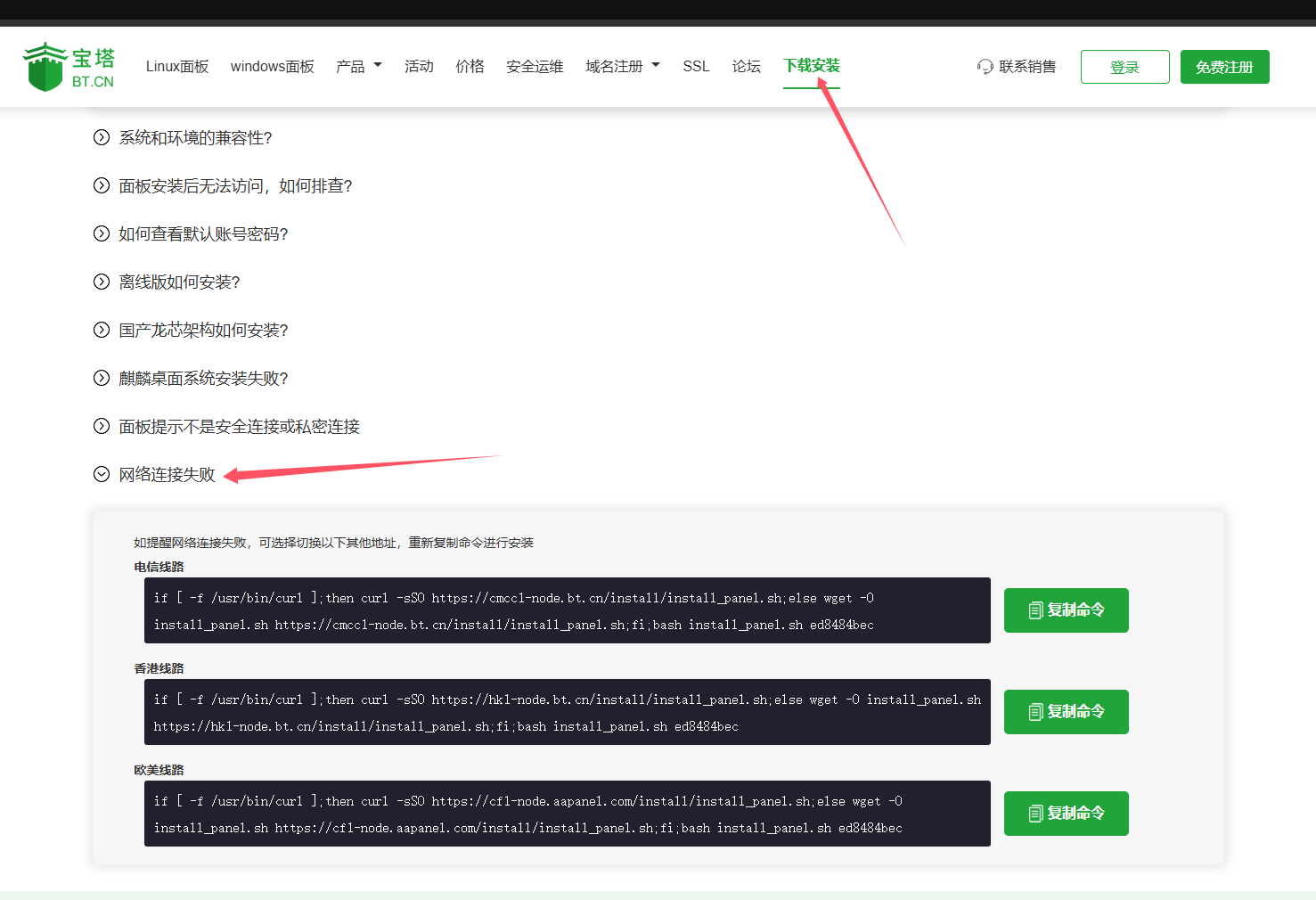
连接不到节点,尝试更换其他节点安装
aa.png
使用道具 举报 回复 支持 反对
发表于 前天 17:38 | 显示全部楼层
阿珂 发表于 2025-12-11 17:11
连接不到节点,尝试更换其他节点安装

[root@localhost ~]# if [ -f /usr/bin/curl ];then curl -sSO https://cmcc1-node.bt.cn/install/install_panel.sh;else wget -O install_panel.sh https://cmcc1-node.bt.cn/install/install_panel.sh;fi;bash install_panel.sh ed8484bec
curl: (35) OpenSSL SSL_connect: 连接被对方重设 in connection to cmcc1-node.bt.cn:443
bash: install_panel.sh: 没有那个文件或目录
[root@localhost ~]# if [ -f /usr/bin/curl ];then curl -sSO https://hk1-node.bt.cn/install/install_panel.sh;else wget -O install_panel.sh https://hk1-node.bt.cn/install/install_panel.sh;fi;bash install_panel.sh ed8484bec
curl: (6) Could not resolve: hk1-node.bt.cn (Domain name not found)
bash: install_panel.sh: 没有那个文件或目录
[root@localhost ~]# if [ -f /usr/bin/curl ];then curl -sSO https://cf1-node.aapanel.com/install/install_panel.sh;else wget -O install_panel.sh https://cf1-node.aapanel.com/install/install_panel.sh;fi;bash install_panel.sh ed8484bec
curl: (35) OpenSSL SSL_connect: 连接被对方重设 in connection to cf1-node.aapanel.com:443
bash: install_panel.sh: 没有那个文件或目录
三个都试了,都不行
使用道具 举报 回复 支持 反对
发表于 昨天 11:09 | 显示全部楼层
系统的ssl有问题,参考:
  1. #备份之前的服务器根证书目录
  2. mv /etc/pki/tls/certs/ca-bundle.crt /etc/pki/tls/certs/ca-bundle.crt_backup
  3. #重新创建服务器根证书目录
  4. mkdir -p /etc/pki/tls/certs
  5. #下载新的服务器根证书
  6. wget -O /etc/pki/tls/certs/ca-bundle.crt https://curl.se/ca/cacert.pem --no-check-certificate
  7. #授权
  8. chmod 444 /etc/pki/tls/certs/ca-bundle.crt
复制代码
使用道具 举报 回复 支持 反对
您需要登录后才可以回帖 登录 | 立即注册

本版积分规则

普通问题处理

论坛响应时间:72小时

问题处理方式:排队(仅解答)

工作时间:白班:9:00 - 18:00

紧急运维服务

响应时间:3分钟

问题处理方式:宝塔专家1对1服务

工作时间:工作日:9:00 - 18:30

宝塔专业团队为您解决服务器疑难问题

点击联系技术分析

工作时间:09:00至18:30

快速回复 返回顶部 返回列表