宝塔双12特惠活动,企业版2399元/3年,立省600元,还送3年SSL证书!查看活动
当前位置:论坛首页 > Linux面板 > Linux面板教程

监测黑客入侵服务器的事件----【堡塔入侵检测】

发表在 Linux面板2023-5-26 12:27   [复制链接] 230 98202

堡塔安全Bacon 发表于 2025-12-4 09:18
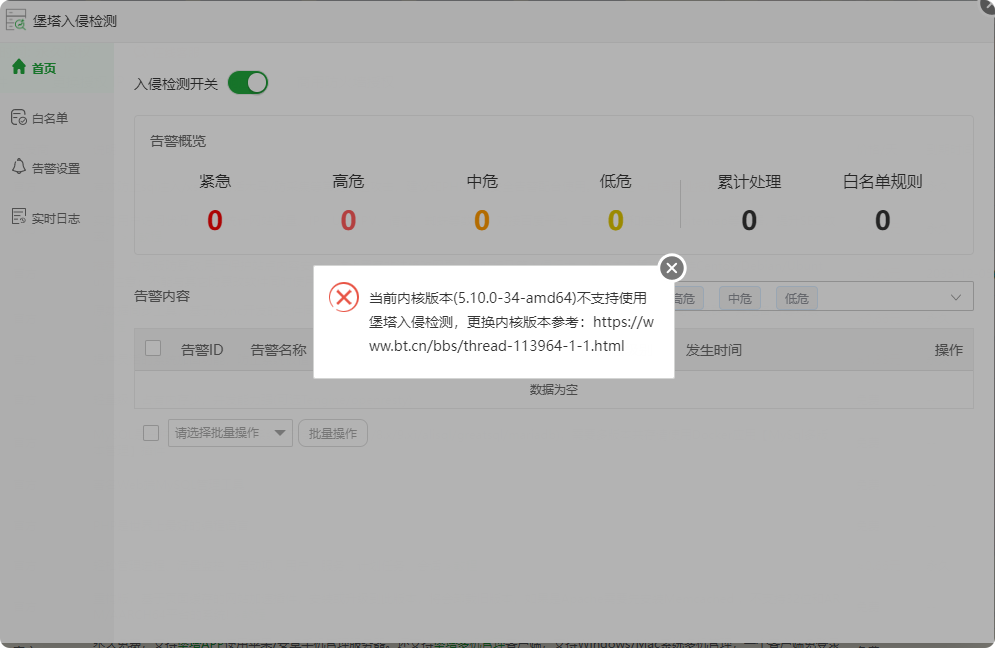
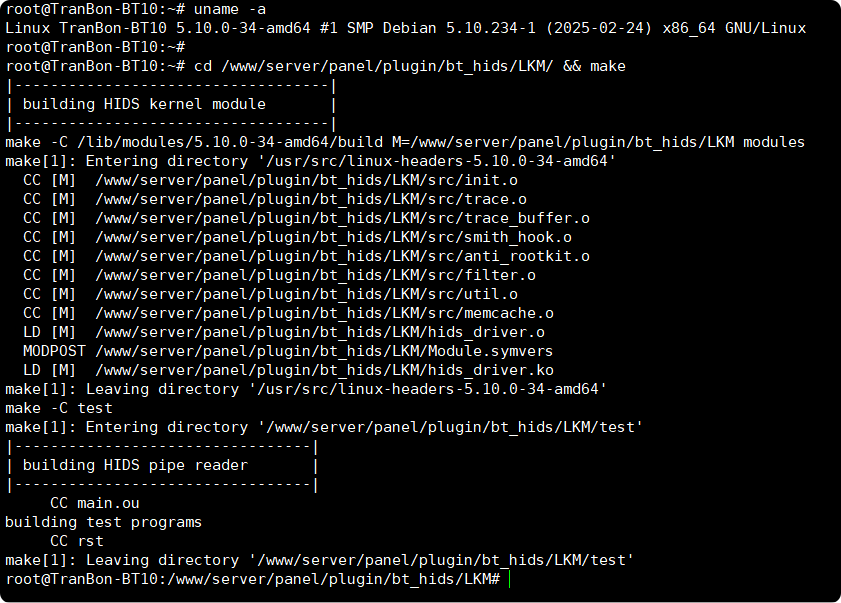
已编译成功,修复一下插件就可以正常使用了

修复插件后还是不行
  1. root@TranBon-BT10:~# uname -a
  2. Linux TranBon-BT10 5.10.0-34-amd64 #1 SMP Debian 5.10.234-1 (2025-02-24) x86_64 GNU/Linux
  3. root@TranBon-BT10:~#
  4. root@TranBon-BT10:~# cd /www/server/panel/plugin/bt_hids/LKM/ && make
  5. |-----------------------------------|
  6. | building HIDS kernel module       |
  7. |-----------------------------------|
  8. make -C /lib/modules/5.10.0-34-amd64/build M=/www/server/panel/plugin/bt_hids/LKM modules
  9. make[1]: Entering directory '/usr/src/linux-headers-5.10.0-34-amd64'
  10.   CC [M]  /www/server/panel/plugin/bt_hids/LKM/src/init.o
  11.   CC [M]  /www/server/panel/plugin/bt_hids/LKM/src/trace.o
  12.   CC [M]  /www/server/panel/plugin/bt_hids/LKM/src/trace_buffer.o
  13.   CC [M]  /www/server/panel/plugin/bt_hids/LKM/src/smith_hook.o
  14.   CC [M]  /www/server/panel/plugin/bt_hids/LKM/src/anti_rootkit.o
  15.   CC [M]  /www/server/panel/plugin/bt_hids/LKM/src/filter.o
  16.   CC [M]  /www/server/panel/plugin/bt_hids/LKM/src/util.o
  17.   CC [M]  /www/server/panel/plugin/bt_hids/LKM/src/memcache.o
  18.   LD [M]  /www/server/panel/plugin/bt_hids/LKM/hids_driver.o
  19.   MODPOST /www/server/panel/plugin/bt_hids/LKM/Module.symvers
  20.   LD [M]  /www/server/panel/plugin/bt_hids/LKM/hids_driver.ko
  21. make[1]: Leaving directory '/usr/src/linux-headers-5.10.0-34-amd64'
  22. make -C test
  23. make[1]: Entering directory '/www/server/panel/plugin/bt_hids/LKM/test'
  24. |---------------------------------|
  25. | building HIDS pipe reader       |
  26. |---------------------------------|
  27.      CC main.ou
  28. building test programs
  29.      CC rst
  30. make[1]: Leaving directory '/www/server/panel/plugin/bt_hids/LKM/test'
  31. root@TranBon-BT10:/www/server/panel/plugin/bt_hids/LKM#
复制代码

局部截取_20251207_142921.png 局部截取_20251207_142915.png 局部截取_20251207_143054.png
使用道具 举报 回复 支持 反对
本帖最后由 宝塔用户_gudovt 于 2025-12-9 14:20 编辑

企业微信截图_20251209082546.png |-----------------------------------|| building HIDS kernel module       |
|-----------------------------------|
make -C /lib/modules/5.14.0-503.40.1.el9_5.x86_64/build M=/www/server/panel/plugin/bt_hids/LKM modules
make[1]: Entering directory '/usr/src/kernels/5.14.0-503.40.1.el9_5.x86_64'
make[1]: Leaving directory '/usr/src/kernels/5.14.0-503.40.1.el9_5.x86_64'
make -C test
make[1]: Entering directory '/www/server/panel/plugin/bt_hids/LKM/test'
|---------------------------------|
| building HIDS pipe reader       |
|---------------------------------|
     CC main.ou
building test programs
     CC rst
make[1]: Leaving directory '/www/server/panel/plugin/bt_hids/LKM/test'


uname -a
Linux localhost 5.14.0-503.40.1.el9_5.x86_64 #1 SMP PREEMPT_DYNAMIC Mon May 5 06:06:04 EDT 2025 x86_64 x86_64 x86_64 GNU/Linux


使用道具 举报 回复 支持 反对
发表于 3 天前 | 显示全部楼层
Debian13不支持和兼容
使用道具 举报 回复 支持 反对
发表于 昨天 16:28 | 显示全部楼层
系统版本:# cat /etc/os-release
NAME="Alibaba Cloud Linux"
VERSION="3 (OpenAnolis Edition)"
ID="alinux"
ID_LIKE="rhel fedora centos anolis"
VERSION_ID="3"
VARIANT="OpenAnolis Edition"
VARIANT_ID="openanolis"
ALINUX_MINOR_ID="2104"
ALINUX_UPDATE_ID="12.1"
PLATFORM_ID="platform:al8"
PRETTY_NAME="Alibaba Cloud Linux 3.2104 U12.1 (OpenAnolis Edition)"
ANSI_COLOR="0;31"
HOME_URL="https://www.aliyun.com/"

make执行情况:
]# cd /www/server/panel/plugin/bt_hids/LKM/ && make
|-----------------------------------|
| building HIDS kernel module       |
|-----------------------------------|
make -C /lib/modules/5.10.134-19.1.al8.x86_64/build M=/www/server/panel/plugin/bt_hids/LKM modules
make[1]: Entering directory '/usr/src/kernels/5.10.134-19.1.al8.x86_64'
  CC [M]  /www/server/panel/plugin/bt_hids/LKM/src/init.o
  LD [M]  /www/server/panel/plugin/bt_hids/LKM/hids_driver.o
  MODPOST /www/server/panel/plugin/bt_hids/LKM/Module.symvers
  CC [M]  /www/server/panel/plugin/bt_hids/LKM/hids_driver.mod.o
  LD [M]  /www/server/panel/plugin/bt_hids/LKM/hids_driver.ko
make[1]: Leaving directory '/usr/src/kernels/5.10.134-19.1.al8.x86_64'
make -C test
make[1]: Entering directory '/www/server/panel/plugin/bt_hids/LKM/test'
|---------------------------------|
| building HIDS pipe reader       |
|---------------------------------|
     CC main.ou
building test programs
     CC rst
make[1]: Leaving directory '/www/server/panel/plugin/bt_hids/LKM/test'
使用道具 举报 回复 支持 反对
发表于 昨天 16:34 | 显示全部楼层
Alibaba Cloud 3 (OpenAnolis Edition)不支持,

系统信息如下:
  1. # cat /etc/os-release
  2. NAME="Alibaba Cloud Linux"
  3. VERSION="3 (OpenAnolis Edition)"
  4. ID="alinux"
  5. ID_LIKE="rhel fedora centos anolis"
  6. VERSION_ID="3"
  7. VARIANT="OpenAnolis Edition"
  8. VARIANT_ID="openanolis"
  9. ALINUX_MINOR_ID="2104"
  10. ALINUX_UPDATE_ID="12.1"
  11. PLATFORM_ID="platform:al8"
  12. PRETTY_NAME="Alibaba Cloud Linux 3.2104 U12.1 (OpenAnolis Edition)"
  13. ANSI_COLOR="0;31"
  14. HOME_URL="https://www.aliyun.com/"
复制代码


运行文档指令结果如下
  1. ]# cd /www/server/panel/plugin/bt_hids/LKM/ && make
  2. |-----------------------------------|
  3. | building HIDS kernel module       |
  4. |-----------------------------------|
  5. make -C /lib/modules/5.10.134-19.1.al8.x86_64/build M=/www/server/panel/plugin/bt_hids/LKM modules
  6. make[1]: Entering directory '/usr/src/kernels/5.10.134-19.1.al8.x86_64'
  7.   CC [M]  /www/server/panel/plugin/bt_hids/LKM/src/init.o
  8.   LD [M]  /www/server/panel/plugin/bt_hids/LKM/hids_driver.o
  9.   MODPOST /www/server/panel/plugin/bt_hids/LKM/Module.symvers
  10.   CC [M]  /www/server/panel/plugin/bt_hids/LKM/hids_driver.mod.o
  11.   LD [M]  /www/server/panel/plugin/bt_hids/LKM/hids_driver.ko
  12. make[1]: Leaving directory '/usr/src/kernels/5.10.134-19.1.al8.x86_64'
  13. make -C test
  14. make[1]: Entering directory '/www/server/panel/plugin/bt_hids/LKM/test'
  15. |---------------------------------|
  16. | building HIDS pipe reader       |
  17. |---------------------------------|
  18.      CC main.ou
  19. building test programs
  20.      CC rst
  21. make[1]: Leaving directory '/www/server/panel/plugin/bt_hids/LKM/test'
复制代码
使用道具 举报 回复 支持 反对
发表于 昨天 17:00 | 显示全部楼层
系统:Ubuntu 22.04.5 LTS (Jammy Jellyfish) x86_64(Py3.7.8)
当前内核版本(5.15.0-163-generic)不支持使用堡塔入侵检测,更换内核版本参考:
https://www.bt.cn/bbs/thread-113964-1-1.html

Last login: Thu Dec 11 09:12:50 2025 from 127.0.0.1
root@ser292211515307:~#     cd /www/server/panel/plugin/bt_hids/LKM/ && make
|-----------------------------------|
| building HIDS kernel module       |
|-----------------------------------|
make -C /lib/modules/5.15.0-163-generic/build M=/www/server/panel/plugin/bt_hids/LKM modules
make[1]: Entering directory '/usr/src/linux-headers-5.15.0-163-generic'
  CC [M]  /www/server/panel/plugin/bt_hids/LKM/src/init.o
  CC [M]  /www/server/panel/plugin/bt_hids/LKM/src/trace.o
  CC [M]  /www/server/panel/plugin/bt_hids/LKM/src/trace_buffer.o
  CC [M]  /www/server/panel/plugin/bt_hids/LKM/src/smith_hook.o
  CC [M]  /www/server/panel/plugin/bt_hids/LKM/src/anti_rootkit.o
  CC [M]  /www/server/panel/plugin/bt_hids/LKM/src/filter.o
  CC [M]  /www/server/panel/plugin/bt_hids/LKM/src/util.o
  CC [M]  /www/server/panel/plugin/bt_hids/LKM/src/memcache.o
  LD [M]  /www/server/panel/plugin/bt_hids/LKM/hids_driver.o
  MODPOST /www/server/panel/plugin/bt_hids/LKM/Module.symvers
  CC [M]  /www/server/panel/plugin/bt_hids/LKM/hids_driver.mod.o
  LD [M]  /www/server/panel/plugin/bt_hids/LKM/hids_driver.ko
  BTF [M] /www/server/panel/plugin/bt_hids/LKM/hids_driver.ko
Skipping BTF generation for /www/server/panel/plugin/bt_hids/LKM/hids_driver.ko due to unavailability of vmlinux
make[1]: Leaving directory '/usr/src/linux-headers-5.15.0-163-generic'
make -C test
make[1]: Entering directory '/www/server/panel/plugin/bt_hids/LKM/test'
|---------------------------------|
| building HIDS pipe reader       |
|---------------------------------|
     CC main.ou
building test programs
     CC rst
make[1]: Leaving directory '/www/server/panel/plugin/bt_hids/LKM/test'
root@ser292211515307:/www/server/panel/plugin/bt_hids/LKM#
使用道具 举报 回复 支持 反对
您需要登录后才可以回帖 登录 | 立即注册

本版积分规则

普通问题处理

论坛响应时间:72小时

问题处理方式:排队(仅解答)

工作时间:白班:9:00 - 18:00

紧急运维服务

响应时间:3分钟

问题处理方式:宝塔专家1对1服务

工作时间:工作日:9:00 - 18:30

宝塔专业团队为您解决服务器疑难问题

点击联系技术分析

工作时间:09:00至18:30

快速回复 返回顶部 返回列表