您好,自openssl1.1.1开始,就已经支持国密算法了。我用的是redhat系列的,查看正常的
- nginx -V
- nginx version: nginx/1.18.0
- built by gcc 8.5.0 20210514 (Red Hat 8.5.0-28) (GCC)
- built with GmSSL 2.5.4 - OpenSSL 1.1.0d 19 Jun 2019
- TLS SNI support enabled
- configure arguments: --user=www --group=www --prefix=/www/server/nginx --add-module=/www/server/nginx/src/ngx_devel_kit --add-module=/www/server/nginx/src/lua_nginx_module --add-module=/www/server/nginx/src/ngx_cache_purge --add-module=/www/server/nginx/src/nginx-sticky-module-ng-1.3.0 --with-openssl=/www/server/nginx/src/openssl --with-pcre=pcre-8.43 --with-http_v2_module --with-stream --with-stream_ssl_module --with-stream_ssl_preread_module --with-http_stub_status_module --with-http_ssl_module --with-http_image_filter_module --with-http_gzip_static_module --with-http_gunzip_module --with-ipv6 --with-http_sub_module --with-http_flv_module --with-http_addition_module --with-http_realip_module --with-http_mp4_module --with-http_auth_request_module --add-module=/www/server/nginx/src/ngx_http_substitutions_filter_module-master --with-ld-opt=-Wl,-E --with-cc-opt=-Wno-error --with-ld-opt=-ljemalloc --with-http_dav_module --add-module=/www/server/nginx/src/nginx-dav-ext-module
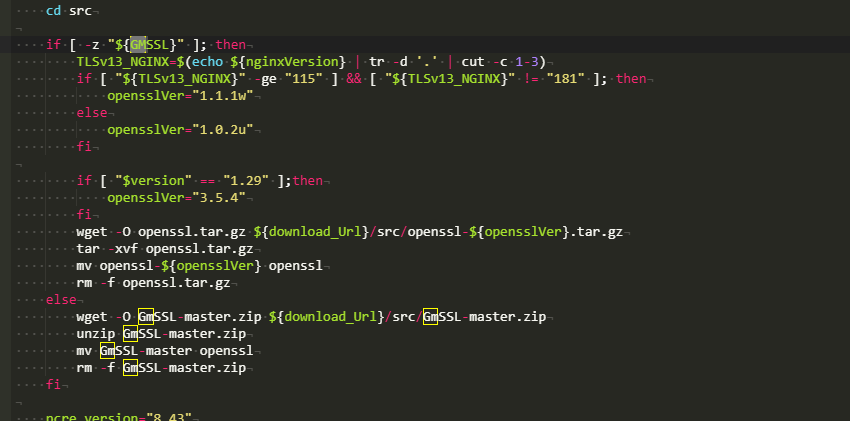
这是nginx安装脚本里的国密SSL代码
|





 运维要高效,装宝塔