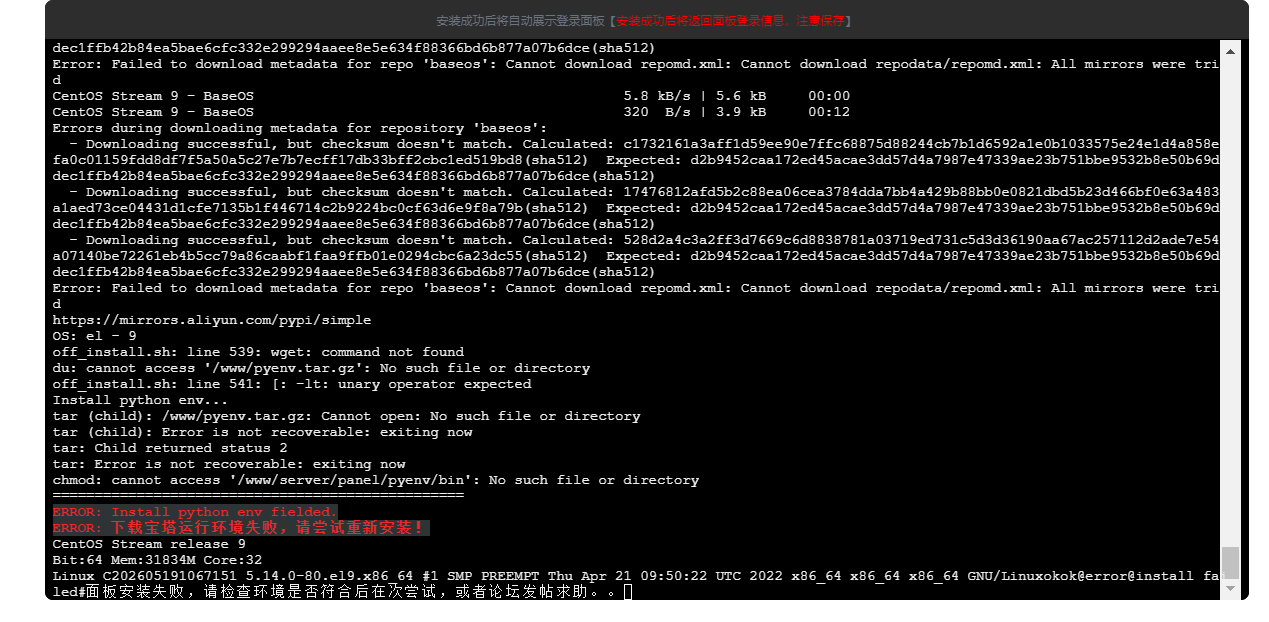
您好,看安装过程,是因为您的服务器使用的CentOS Stream 9 的安装源无法安装 wget命令,导致后续下载安装包失败,无法进行解压。如果不是特殊情况必须要使用CentOS Stream 9 的系统,请更换Debian12 /Ubuntu 24这类官方长期支持的系统,而且安装源国内也比较好找。
如果必须要使用CentOS 9 Stream 请参考以下内容进行更换安装源
1、备份当前的操作系统的安装源:
- mv /etc/yum.repos.d/CentOS-Stream.repo /etc/yum.repos.d/CentOS-Stream.repo_backup
2、更换阿里云的CentOS Stream 9的安装源
- cat > /etc/yum.repos.d/CentOS-Stream.repo <<'EOF'
- # CentOS-Stream.repo
- #
- # The mirror system uses the connecting IP address of the client and the update status of each mirror to pick mirrors that are updated to date and close to the client. You should use this for CentOS updates unless you are manually picking other mirrors.
- #
- #
- [baseos]
- name=CentOS Stream $releasever - BaseOS
- baseurl=http://mirrors.aliyun.com/centos/$releasever-stream/BaseOS/$basearch/os/
- gpgcheck=1
- gpgkey=http://mirrors.aliyun.com/centos/RPM-GPG-KEY-centosofficial
- [appstream]
- name=CentOS Stream $releasever - AppStream
- baseurl=http://mirrors.aliyun.com/centos/$releasever-stream/AppStream/$basearch/os/
- gpgcheck=1
- gpgkey=http://mirrors.aliyun.com/centos/RPM-GPG-KEY-centosofficial
- [extras]
- name=CentOS Stream $releasever - Extras
- baseurl=http://mirrors.aliyun.com/centos/$releasever-stream/extras/$basearch/os/
- gpgcheck=1
- gpgkey=http://mirrors.aliyun.com/centos/RPM-GPG-KEY-centosofficial
- [powertools]
- name=CentOS Stream $releasever - PowerTools
- baseurl=http://mirrors.aliyun.com/centos/$releasever-stream/PowerTools/$basearch/os/
- gpgcheck=1
- enabled=0
- gpgkey=http://mirrors.aliyun.com/centos/RPM-GPG-KEY-centosofficial
- EOF
3、清理旧的安装源并更新当前最新的安装源
- yum clean && yum makecache
4、如果替换了还是不行,建议更换Debian12或者Ubuntu24
|





 运维要高效,装宝塔