当前位置:论坛首页 > Linux面板 > 求助

【已回应】宝塔Nginx-Tengine模块http_concat_module无法开启

发表在 Linux面板2020-5-10 15:52 [复制链接] 4 3457

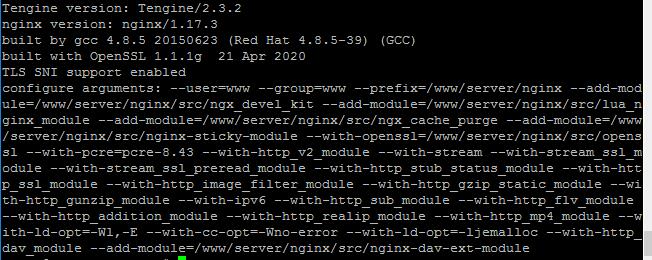
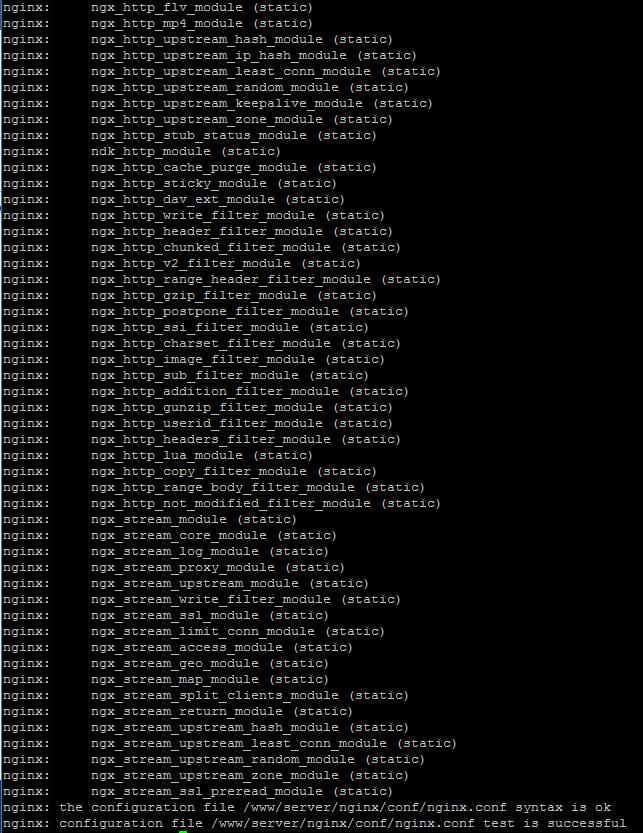
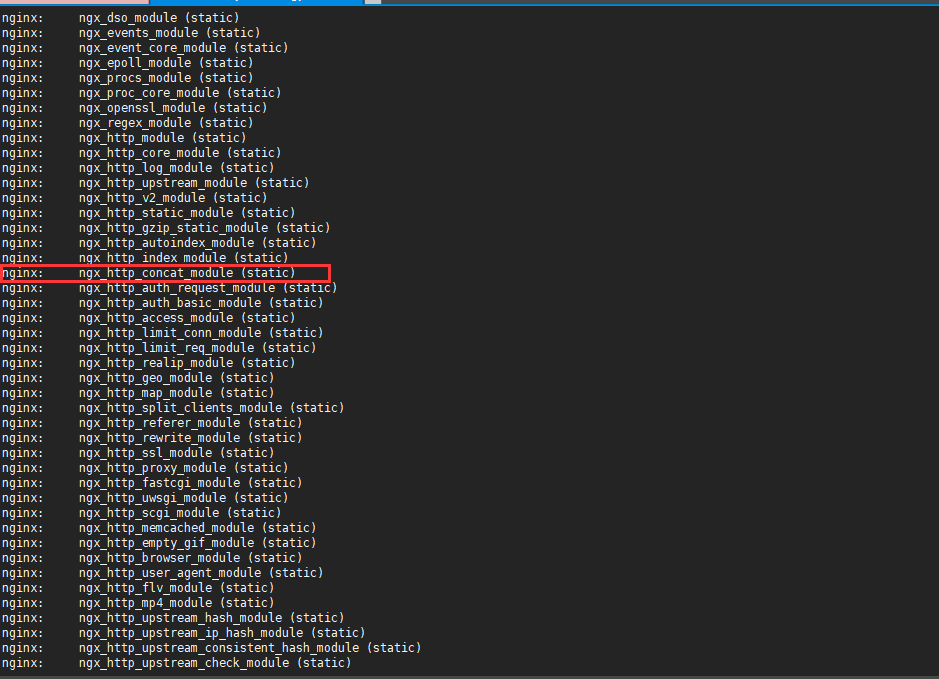
http_concat_module编译重启好几次,还是没有开启。
  1. ./configure --add-module=/www/server/nginx/src/nginx-http-concat
复制代码
  1. make && make install
复制代码


11111.jpg

2222.jpg

使用道具 举报 只看该作者 回复
发表于 2020-5-11 10:53:07 | 显示全部楼层
该模块是默认安装开启的,卸载nginx后重新使用极速模式安装一下nginx-Tengine2.2.3才有该模块,编译模式是没有的。
520.png
使用道具 举报 回复 支持 反对
发表于 2020-5-11 11:37:03 | 显示全部楼层
https://www.bt.cn/bbs/forum.php?mod=viewthread&tid=32773
参考此贴,因为你的
http_concat_module 模块不在 /www/server/nginx/src/nginx-http-concat 这个路径下,从新创建一个目录存放这个模块
使用道具 举报 回复 支持 反对
发表于 2020-5-13 08:45:44 | 显示全部楼层
谢花郎 发表于 2020-5-11 10:53
该模块是默认安装开启的,卸载nginx后重新使用极速模式安装一下nginx-Tengine2.2.3才有该模块,编译模式是 ...

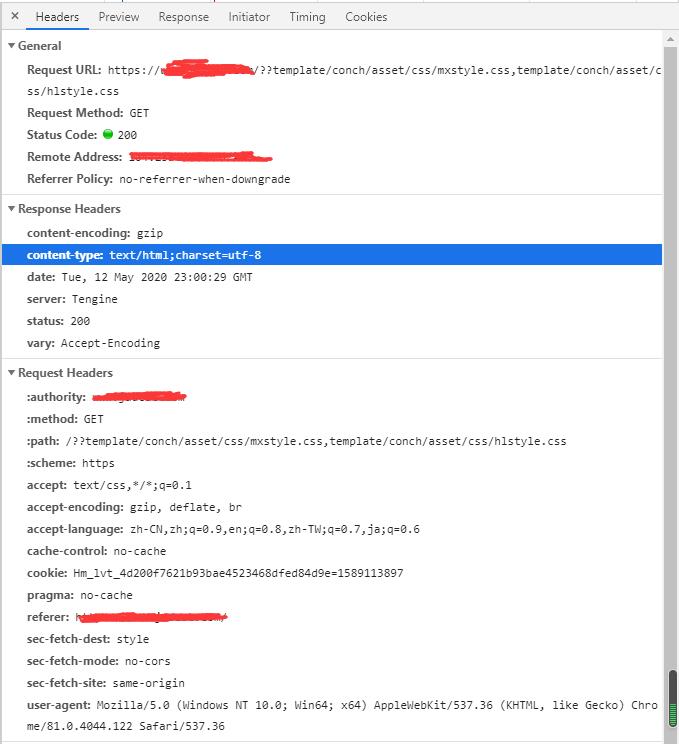
已经解决,自己从官网tegine重新下载后把http_concat_module模块给替换掉,重新编译后就OK了。但是出现了个新问题,合并CSS和JS都会出现加载失败,原因是response headers里的content type都变成了text/html。 尝试了nginx各种设置,但是还是不行,求大神帮忙!
QQ截图20200513081625.jpg

nginx.conf
  1. user  www www;
  2. worker_processes auto;
  3. error_log  /www/wwwlogs/nginx_error.log  crit;
  4. pid        /www/server/nginx/logs/nginx.pid;
  5. worker_rlimit_nofile 65535;

  6. events
  7.     {
  8.         use epoll;
  9.         worker_connections 65535;
  10.         accept_mutex on;
  11.         multi_accept on;
  12.     }

  13. http
  14.     {
  15.         default_type  application/octet-stream;
  16.         include  /www/server/nginx/conf/mime.types;
  17.                     #include luawaf.conf;
  18.                     include proxy.conf;

  19.         log_format  main  '$remote_addr - $remote_user [$time_local] "$request" '
  20.                           '$status $body_bytes_sent "$http_referer" '
  21.                           '"$http_user_agent" "$http_x_forwarded_for"';
  22.                           
  23.         log_format logstash_json '{"@timestamp":"$time_iso8601",'
  24.         '"host":"$server_addr",'
  25.         '"clientip":"$remote_addr",'
  26.         '"size":$body_bytes_sent,'
  27.         '"responsetime":$request_time,'
  28.         '"upstreamtime":"$upstream_response_time",'
  29.         '"upstreamhost":"$upstream_addr",'
  30.         '"http_host":"$host",'
  31.         '"url":"$uri",'
  32.         '"domain":"$host",'
  33.         '"xff":"$http_x_forwarded_for",'
  34.         '"referer":"$http_referer",'
  35.         '"agent":"$http_user_agent",'
  36.         '"status":"$status"}';

  37.         server_names_hash_bucket_size 512;
  38.         client_header_buffer_size 32k;
  39.         large_client_header_buffers 4 32k;
  40.         client_max_body_size 10m;

  41.         sendfile   on;
  42.         tcp_nopush on;

  43.         keepalive_timeout 65 60;

  44.         tcp_nodelay on;

  45.         fastcgi_connect_timeout 300;
  46.         fastcgi_send_timeout 300;
  47.         fastcgi_read_timeout 300;
  48.         fastcgi_buffer_size 64k;
  49.         fastcgi_buffers 4 64k;
  50.         fastcgi_busy_buffers_size 128k;
  51.         fastcgi_temp_file_write_size 256k;
  52.                     fastcgi_intercept_errors on;

  53.         gzip on;
  54.         gzip_min_length  1k;
  55.         gzip_buffers     4 16k;
  56.         gzip_http_version 1.1;
  57.         gzip_comp_level 2;
  58.         gzip_types     text/plain application/javascript application/x-javascript text/javascript text/css application/xml;
  59.         gzip_vary on;
  60.         gzip_proxied   expired no-cache no-store private auth;
  61.         gzip_disable   "MSIE [1-6]\.";

  62.         limit_conn_zone $binary_remote_addr zone=perip:10m;
  63.                     limit_conn_zone $server_name zone=perserver:10m;

  64.         server_tokens off;
  65.         access_log off;
  66. server
  67.     {
  68.         listen 888;
  69.         server_name phpMyAdmin;
  70.         index index.html index.htm index.php;
  71.         root  /www/server/phpMyAdmin;

  72.         #error_page   404   /404.html;
  73.         include enable-php.conf;
  74.         
  75.         location / {
  76.             root   html;
  77.             index  index.html index.htm;
  78.             proxy_connect_timeout 60;
  79.             proxy_send_timeout 60;
  80.             proxy_read_timeout 60;
  81.         }
  82.         
  83.         location ~ .*\.(gif|jpg|jpeg|png|bmp|swf)$
  84.         {
  85.             expires      30d;
  86.         }

  87.         location ~ .*\.(js|css)?$
  88.         {
  89.             expires      12h;
  90.         }
  91.         location ~ \.css {
  92.             concat on;
  93.             concat_max_files 20;
  94.             concat_ignore_file_error on;
  95.             add_header  Content-Type    text/css;
  96.         }
  97.         location ~ \.js {
  98.             concat on;
  99.             concat_max_files 30;
  100.             concat_ignore_file_error on;
  101.             add_header  Content-Type    application/x-javascript;
  102.         }
  103.         location ~ /\.
  104.         {
  105.             deny all;
  106.         }
  107.         location ~* \.php$ {
  108.             root    /usr/share/nginx/html;
  109.             index   index.html index.htm index.php;
  110.             fastcgi_split_path_info ^(.+\.php)(/.+)$; #this line
  111.                     fastcgi_pass   127.0.0.1:9000;
  112.             fastcgi_index  index.php;
  113.             fastcgi_param  SCRIPT_FILENAME
  114.             $document_root$fastcgi_script_name; # update this too
  115.             include        fastcgi_params;
  116.         }
  117.         error_page   500 502 503 504  /50x.html;
  118.         location = /50x.html {
  119.             root   html;
  120.         }   
  121.         access_log  /www/wwwlogs/access.log;
  122.     }
  123. include /www/server/panel/vhost/nginx/*.conf;
  124. }
复制代码


使用道具 举报 回复 支持 反对
发表于 2020-5-13 08:47:37 | 显示全部楼层
大炮运维V587 发表于 2020-5-11 11:37
https://www.bt.cn/bbs/forum.php?mod=viewthread&tid=32773
参考此贴,因为你的
http_concat_module 模块 ...

已经解决,自己从官网tegine重新下载后把http_concat_module模块给替换掉,重新编译后就OK了。但是出现了个新问题,合并CSS和JS都会出现加载失败,原因是response headers里的content type都变成了text/html。 尝试了nginx各种设置,但是还是不行,求大神帮忙!


nginx.conf
  1. user www www;
  2. worker_processes auto;
  3. error_log /www/wwwlogs/nginx_error.log crit;
  4. pid /www/server/nginx/logs/nginx.pid;
  5. worker_rlimit_nofile 65535;

  6. events
  7. {
  8. use epoll;
  9. worker_connections 65535;
  10. accept_mutex on;
  11. multi_accept on;
  12. }

  13. http
  14. {
  15. default_type application/octet-stream;
  16. include /www/server/nginx/conf/mime.types;
  17. #include luawaf.conf;
  18. include proxy.conf;

  19. log_format main '$remote_addr - $remote_user [$time_local] "$request" '
  20. '$status $body_bytes_sent "$http_referer" '
  21. '"$http_user_agent" "$http_x_forwarded_for"';

  22. log_format logstash_json '{"@timestamp":"$time_iso8601",'
  23. '"host":"$server_addr",'
  24. '"clientip":"$remote_addr",'
  25. '"size":$body_bytes_sent,'
  26. '"responsetime":$request_time,'
  27. '"upstreamtime":"$upstream_response_time",'
  28. '"upstreamhost":"$upstream_addr",'
  29. '"http_host":"$host",'
  30. '"url":"$uri",'
  31. '"domain":"$host",'
  32. '"xff":"$http_x_forwarded_for",'
  33. '"referer":"$http_referer",'
  34. '"agent":"$http_user_agent",'
  35. '"status":"$status"}';

  36. server_names_hash_bucket_size 512;
  37. client_header_buffer_size 32k;
  38. large_client_header_buffers 4 32k;
  39. client_max_body_size 10m;

  40. sendfile on;
  41. tcp_nopush on;

  42. keepalive_timeout 65 60;

  43. tcp_nodelay on;

  44. fastcgi_connect_timeout 300;
  45. fastcgi_send_timeout 300;
  46. fastcgi_read_timeout 300;
  47. fastcgi_buffer_size 64k;
  48. fastcgi_buffers 4 64k;
  49. fastcgi_busy_buffers_size 128k;
  50. fastcgi_temp_file_write_size 256k;
  51. fastcgi_intercept_errors on;

  52. gzip on;
  53. gzip_min_length 1k;
  54. gzip_buffers 4 16k;
  55. gzip_http_version 1.1;
  56. gzip_comp_level 2;
  57. gzip_types text/plain application/javascript application/x-javascript text/javascript text/css application/xml;
  58. gzip_vary on;
  59. gzip_proxied expired no-cache no-store private auth;
  60. gzip_disable "MSIE [1-6]\.";

  61. limit_conn_zone $binary_remote_addr zone=perip:10m;
  62. limit_conn_zone $server_name zone=perserver:10m;

  63. server_tokens off;
  64. access_log off;
  65. server
  66. {
  67. listen 888;
  68. server_name phpMyAdmin;
  69. index index.html index.htm index.php;
  70. root /www/server/phpMyAdmin;

  71. #error_page 404 /404.html;
  72. include enable-php.conf;

  73. location / {
  74. root html;
  75. index index.html index.htm;
  76. proxy_connect_timeout 60;
  77. proxy_send_timeout 60;
  78. proxy_read_timeout 60;
  79. }

  80. location ~ .*\.(gif|jpg|jpeg|png|bmp|swf)$
  81. {
  82. expires 30d;
  83. }

  84. location ~ .*\.(js|css)?$
  85. {
  86. expires 12h;
  87. }
  88. location ~ \.css {
  89. concat on;
  90. concat_max_files 20;
  91. concat_ignore_file_error on;
  92. add_header Content-Type text/css;
  93. }
  94. location ~ \.js {
  95. concat on;
  96. concat_max_files 30;
  97. concat_ignore_file_error on;
  98. add_header Content-Type application/x-javascript;
  99. }
  100. location ~ /\.
  101. {
  102. deny all;
  103. }
  104. location ~* \.php$ {
  105. root /usr/share/nginx/html;
  106. index index.html index.htm index.php;
  107. fastcgi_split_path_info ^(.+\.php)(/.+)$; #this line
  108. fastcgi_pass 127.0.0.1:9000;
  109. fastcgi_index index.php;
  110. fastcgi_param SCRIPT_FILENAME
  111. $document_root$fastcgi_script_name; # update this too
  112. include fastcgi_params;
  113. }
  114. error_page 500 502 503 504 /50x.html;
  115. location = /50x.html {
  116. root html;
  117. }
  118. access_log /www/wwwlogs/access.log;
  119. }
  120. include /www/server/panel/vhost/nginx/*.conf;
  121. }
复制代码


使用道具 举报 回复 支持 反对
您需要登录后才可以回帖 登录 | 立即注册

本版积分规则

紧急运维服务

响应时间:3分钟

问题处理方式:宝塔专家1对1服务

工作时间:工作日:9:00 - 18:30

宝塔专业团队为您解决服务器疑难问题

点击联系技术分析

工作时间:09:00至18:30

快速回复 返回顶部 返回列表